Showing posts with label review. Show all posts
Showing posts with label review. Show all posts
Tuesday, November 06, 2012


Sunday, November 04, 2012
Sunday, August 26, 2012
More on Windows 8
Tim Edwards on Why I’m uninstalling Windows 8. Click through to read his detailed list.
As a cruel trick on myself, about a month ago I installed Windows 8 on my main PC to see what it was like.
The answer is: abysmal.
I don’t think it’s an exaggeration to say that Windows 8 is the worst computing experience I’ve ever had. As a desktop operating system, it’s annoying, frustrating, irritating, and baffling to use. I’ve tried on many occasions to explain exactly why it’s so awful to use day-to-day, and most of the time, smoke starts pouring out of my ears. I thought it would be better to get down exactly what the issues are and why you should avoid it.
What it comes down to is this: Windows 8 is a tax on your brain. That dealing with it, day in, day out adds to your world being slightly worse in a dozen different but slightly irritating ways.
This isn’t an exhaustive list, but it is an exhausting list of reasons why I’ll never touch Windows 8 again. This isn’t an exhaustive list, but it is an exhausting list of reasons why I’ll never touch Windows 8 again. I’m not alone: game developers worldwide have declared Windows 8 a catastrophe.
- Posted using BlogPress from my iPad
Wednesday, August 15, 2012
Samsung Galaxy Note 10.1 a Disappointing Android Tablet
From Nilay Patel's Samsung Galaxy Note 10.1 review:
On paper, the Note 10.1 seems extremely capable of creating that world: it has an extremely fast quad-core processor, the ability to run multiple apps side-by-side on the 10.1-inch display, and, of course, Samsung’s Wacom-powered S Pen stylus, which has been upgraded from the smartphone Note to offer 1024 levels of pressure sensitivity. Other Android devices have tried and failed to meaningfully incorporate stylus support, but only Samsung’s 5-inch Galaxy Note smartphone has ever been a success, and I had high hopes the Note 10.1 would simply be a larger version of that experience.
…
It’s pretty clear that people want their tablets to support pen input — the huge market of iPad styluses is proof positive of that. Samsung’s S Pen system is way ahead of the curve in that regard: it’s responsive, it’s precise, and it works well enough, most of the time.
But a pretty good pen system built on top of a disappointing Android tablet still makes for a disappointing Android tablet. There’s just no reason to suffer through it: the Nexus 7 costs less than half as much as the Note and is without question the best Android tablet available. The iPad costs the same $499 and offers an unrivaled selection of apps, an industry-leading display, and so many stylus accessories and note-taking tools that you won’t even remember that the S Pen makes them all look a bit primitive. And a regular notebook and pen do not make blooping sounds at the slightest provocation.
Thursday, June 14, 2012
Windows 8 in a Word
Adrian Kingsley-Hughes shares his Final thoughts on Windows 8: A design disaster:
I’m now ready to sum up my Windows 8 experience with a single word: awful.
I could have chosen a number of other words — terrible, horrible, painful and execrable all spring to mind — but it doesn’t matter, the sentiment is the same.
Thursday, May 31, 2012
"Why Windows 8 Scares Me"
Michael Mace on Fear and Loathing and Windows 8. Very detailed and thorough review of Windows 8.
I was very excited when I saw the first demos of Windows 8. After years of settling for mediocre incremental improvements in its core products, Microsoft finally was ready to make bold changes to Windows, something I thought it had to do to stay relevant in computing. What’s more, the changes looked really nice! Once I’d seen the clean, modern-looking videos of Windows 8, the old Windows looked cramped and a little embarrassing, kind of like finding a picture of the way you dressed when you were a senior in high school (link).
So when Microsoft announced that it was releasing a “consumer preview” of Windows 8, I couldn’t wait to play with it. So far I’ve installed Windows 8 on two computers, a middle of the road HP laptop and a mini tablet PC from Japan. I’ve browsed the web and used Office and even tested our new app, Zekira, on it. My conclusion is that Windows 8 in its current form is very different; attractive in some ways, and disturbing in others. It combines an interesting new interface with baffling changes to Windows compatibility, and amateur mistakes in customer messaging. Add up all the changes, and I am very worried that Microsoft may be about to shoot itself in the foot spectacularly. Even the plain colorful graphics in Windows 8 that looked so cool when I first saw them are starting to look ominous to me, like the hotel decor in The Shining.[Emphasis added – MQ]
- Posted using BlogPress from my iPad
Monday, March 26, 2012
The Idea Factory
Working just around the corner from where (Holmdel, NJ) much of this innovation happened, I'm interested in reading how such a successful culture of innovation was created and ultimately how it fell apart.
Michiko Kakutani's review of ‘The Idea Factory,’ by Jon Gertner:
Bell Labs was behind many of the innovations that have come to define modern life, including the transistor (the building block of all digital products), the laser, the silicon solar cell and the computer operating system called Unix (which would serve as the basis for a host of other computer languages). Bell Labs developed the first communications satellites, the first cellular telephone systems and the first fiber-optic cable systems.
The Bell Labs scientist Claude Elwood Shannon effectively founded the field of information theory, which would revolutionize thinking about communications; other Bell Labs researchers helped push the boundaries of physics, chemistry and mathematics, while defining new industrial processes like quality control.
In “The Idea Factory,” Mr. Gertner — an editor at Fast Company magazine and a writer for The New York Times Magazine — not only gives us spirited portraits of the scientists behind Bell Labs’ phenomenal success, but he also looks at the reasons that research organization became such a fount of innovation, laying the groundwork for the networked world we now live in.
...
The very success of Bell Labs, he notes, contained the seeds of its destruction. Not only was it producing too many ideas for a single company to handle, but some of its innovations (like the transistor) also altered the technological landscape so much that its core business would be reduced to a mere part of the ever-expanding field of information and electronic technology — a field increasingly dominated by new rivals, with which a post-monopoly AT&T had difficulty competing.
Tuesday, November 29, 2011
Kindle Fire a Bad Sign for Open Platforms?
Anastasia Salter's First Impressions of the Kindle Fire:
The first-generation Kindle Fire is a strange combination of both worlds, and while it fails to fully satisfy as either it does promise to leave its mark on our media consumption devices and perhaps even make an appearance in our classrooms or our own toolkits for travel and meetings.The Kindle Fire has a few immediate selling points. It’s fairly light, and fits in a decent-sized purse or bag without any trouble. It’s the first time I’ve been convinced that there’s hope for this tablet size, perhaps even as a future replacement for smart phone sized devices. At $200, it’s also a better deal than most tablets on the market. The streaming video content and library-like elements of Amazon Prime membership also offer Netflix some competition.
The user experience of the Kindle Fire is less well-realized beyond these first impressions. The Kindle Fire eliminates interface buttons on the front surface entirely and finding the way back to the main screen can be difficult. The interface bar launcher that stays on-screen with many apps is an unattractive waste of a sliver of screen real estate. In my first hours with the device I was annoyed by several responsiveness problems and found typing to be extremely awkward. While some apps have good on-screen keyboards, the default Kindle Fire keyboard is cramped. For serious notetaking during meetings, it may not be your best bet. Kindle Fire’s much-touted web browser, Silk, also seems slow and clunky compared to the iPad or even Android’s standard smartphone browser.
...
And right now, the apps are still a problem for the Kindle Fire. The app marketplace is still limited, and the number of apps actually optimized for the Kindle Fire is even smaller. I tried a few ProfHacker favorites, such as Evernote, which worked as well as they do on a Android smartphone but not remarkably better. Unlike the difference between apps optimized for the iPad versus the iPhone, which often differ in resolution and interface, there are very few tablet optimized apps for Kindle Fire at this point. I tried a Kindle Fire optimized version of Plants vs. Zombies and happily wasted an hour or two, and the optimized app did look much better than many others. If the Kindle Fire gets enough market share, more apps will likely follow suit.
...
Ultimately, Amazon seems to be trying to make an Apple device to tame the Android world—complete with the same digital rights management and control concerns as the iPad. If this device is successful, and the future of Android points more towards systems like this one, it’s a bad sign for open platforms.
Friday, November 25, 2011
A Positive Review of the Kindle Fire
Erick Schonfeld likes the Kindle Fire
The Kindle Fire, What Is It Good For?:
The Kindle Fire, What Is It Good For?:
The Fire is a standout media tablet that does a few things very well and I am going to tell you what they are.I’ve been using a Kindle Fire for the past two weeks (that is, when my kids or wife haven’t absconded to another room with it). The device passes my first test: my family fights over it. The Fire is kid-tested, and mother-approved. Fruit Ninja is the new obsession with my young children. Even my two-year-old, who loves the iPad, is increasingly eyeing the Kindle Fire and scheming ways to get her Mom out of the room so she can play with it. My wife will have none of that, she’s reading Joan Didion’s latest book on the Fire. I sneak it away from the bedside table when everyone is asleep at night to watch old episodes of Arrested Development.
The Kindle Fire is purpose-built to find and consume digital media: books, movies and TV shows, music, magazines, apps, and the web. It is more limited in its capabilities than an iPad, but in these areas it holds its own.
Thursday, November 17, 2011
Ben Brook's Review of the Kindle Fire
∞ A Review of “the First Serious iPad Competitor”, aka the Kindle Fire:
The long and short of the Fire is that it does quite a few things, but doesn’t do any of them very well. It does many of these things really poorly.
It was about a year ago that I reviewed the original Samsung Galaxy Tab — one of the first Android tablets, also seven inches. The main problems with that tablet were: hardware, lack of software, the OS and the price. Amazon only fixes the price and the hardware (mostly) on the Fire, otherwise the device feels very similar — though more closed — than the Tab did a year ago.
That’s probably not something you want someone to ever say about a new tablet: “feels like one I used a year ago.” Tablets aren’t cars, they don’t get better with age, they just get sad with age.
Wednesday, November 16, 2011
Walt Mossberg's Amazon Kindle Fire Review
Walt Mossberg's Amazon Kindle Fire Review:
This new $199 device is called the Kindle Fire, and after testing it for a week, I think it’s a good—though not a great—product and a very good value. It doesn’t just add color to the Kindle, it adds a robust ability to store and stream music, TV shows and movies—and a weaker ability to store and display color photos. And it offers about 8,500 apps at launch, including Netflix, Angry Birds and QuickOffice.
To be clear, the Kindle Fire is much less capable and versatile than the entry-level $499 iPad 2. It has a fraction of the apps, a smaller screen, much weaker battery life, a slower Web browser, half the internal storage and no cameras or microphone. It also has a rigid and somewhat frustrating user interface far less fluid than Apple’s.
Kindle FireBut the Fire has some big things going for it. First, the $199 price, though the Fire’s seven-inch screen is less than half the surface area of the iPad’s display. Second, the Amazon and Kindle brands, already known and loved for e-readers and more. Third, Amazon is the only major tablet maker other than Apple with a large, famous, easy-to-use content ecosystem that sells music, video, books and periodicals. The Fire can be thought of as a hardware front end to all that cloud content.
Finally, while the Fire, like many other tablets, is based on Google’s Android operating system, Amazon has taken the bold step of hiding Android. It shuns its user interface and nearly all of Google’s apps and services, including Google’s app store. The Fire’s software is all about the content and apps Amazon has sold you and the easy purchase of more.

Monday, November 14, 2011
More on Kindle Fire
According to Sebastian Anthony Kindle Fire's flames have been doused:
Ahead of tomorrow’s full-scale launch of Amazon’s new wunderkind, panacea, and lynchpin of its continuing distribution domination, initial reviews of the Kindle Fire are starting to trickle in… and they’re not as fantastic as we — or you — had hoped. Unsurprisingly, not a single review is denying that the bright screen, solid construction, and $200 price point make for a perfect holiday season outing — but to actually win the hearts of consumers, to steal those throbbing, Cupertino-captivated organs away from the iPad, the Kindle Fire has to be amazing… and it isn’t.
Throughout almost every review, one particularly telling observation rears its ugly head: the Kindle Fire can be sluggish. For the most part, and judging by some video reviews, the Fire is snappy — but sometimes it just slows down. Page turns can lag. Menus can be slow to load. Screen touches can be unresponsive. For a device that is entirely about media consumption, the Fire will live or die depending on its perceived alacrity. If an E Ink Kindle or Nook is better for reading books, and a smartphone or iPad is better for watching movies or listening to music, what space is there for the Fire?
PCMag's Kindle Fire Review
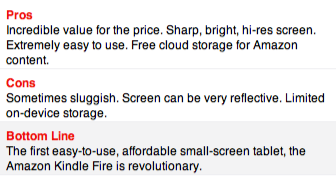
Sascha Segan likes the Kindle Fire - calling it a first-rate tablet - in spite of the sometimes sluggish interface, no cellular or bluetooth, no user-replaceable battery, limited storage, no way to connect to a TV, etc. I guess the bar for an Android tablet is very low. The biggest selling point is the price - half of what most competitors charge. Amazon is banking on the razor-razor blade strategy - sell you the razor at cost or at a loss and make money on the blades (in this case the audio, video, books, and apps Amazon sells).
Amazon Kindle Fire Review & Rating:
The Amazon Kindle Fire puts the Apple iPad on notice. The Fire is the first small tablet that average users can pick up and immediately use, with a simple, clear interface. Then there's the price: Android along with amazing specs for just $199. It's open enough to attract geeks, too. While the user interface occasionally gets sluggish, we're willing to have a bit of patience to get a first-rate tablet for half of what most competitors charge, thus the Kindle Fire is our first Editors' Choice for small tablets.
Monday, October 17, 2011
Ben Brooks Reviews Instapaper 4.0
I can't express how much I agree with his assessment - really a fantastic update for one of my most used iPad and iPhone apps!
∞ An Instapaper 4.0 Review with Some Insight from Marco Arment:
Instapaper has now gone version 4 and Marco Arment has been kind enough to let me test out this new version. I can say that this new version is, without a doubt, fantastic.
Wednesday, October 12, 2011
The iPhone 4S
John Gruber's review of ★ The iPhone 4S:
This is the easiest product review I’ve ever written. The iPhone 4S is exactly what Apple says it is: just like the iPhone 4, but noticeably faster, with a significantly improved camera, and an impressive new voice-driven feature called Siri.
Monday, August 01, 2011
Galaxy Tab 10.1 Versus iPad 2
Very thorough review of the Galaxy Tab 10.1 from DeviceGuru.
Very positive take on the Galaxy Tab, although I disagree with the statement that there's less need of tablet optimized apps because of the browser - i.e. web apps replace many native apps. As said by Robert in the comments: I went for an android tablet because of its more open nature. Of course there are some rough edges but I accept it.
DeviceGuru's conclusion:
- Posted using BlogPress from my iPad
Very positive take on the Galaxy Tab, although I disagree with the statement that there's less need of tablet optimized apps because of the browser - i.e. web apps replace many native apps. As said by Robert in the comments: I went for an android tablet because of its more open nature. Of course there are some rough edges but I accept it.
DeviceGuru's conclusion:
Which is better, the Samsung Galaxy Tab 10.1 or the iPad 2? That depends…
In my tests, the Galaxy Tab 10.1 was more successful than the iPad 2 at streaming video directly from websites, due to its support for Adobe flash. On the other hand, the Galaxy Tab 10.1 has fewer tablet-aware apps than the iPad 2, with Netflix and Crackle being two good examples.
...
So I guess my bottom-line advice is that, at price parity, the iPad 2 is a better bet for the average user, since it’s a more stable, near-perfect device with a rich assortment of apps for nearly every possible function you’d like to perform on your tablet. Therefore, unless you’ve got a grudge against Apple for some reason, or are enamored with the idea of having a more configurable tablet, there’s not a lot of justification to go with the less mature, less established device at the same price.
- Posted using BlogPress from my iPad
Thursday, April 28, 2011
Walt Mossberg on the Android Honeycomb Tablet
Still some catching up to do ...
Honeycomb Tablet Has 4G and 3-D But Is No iPad:
Honeycomb Tablet Has 4G and 3-D But Is No iPad:
The G-Slate uses Google’s standard Honeycomb software—the version of Android especially created for tablets—and is the first Honeycomb tablet in the U.S. to offer 4G cellular data speeds and 3-D video creation and viewing. It sports a screen size—8.9 inches—that falls between the 10-inch dimension of the iPad and the Motorola Xoom, and the 7-inch dimension used by the Samsung Galaxy Tab and the Research in Motion PlayBook.
I’ve been testing the G-Slate, and in my view, it performs pretty well overall—about as well as the first Honeycomb tablet, the Xoom. But it isn’t nearly as good a choice as the iPad 2.
Of its three big differentiators, the only clear winner is the 4G cellular capability, which is much speedier than cellular data on the iPad, or on any other Honeycomb tablet I know of. The 3-D feature, which requires the use of 1950s-style colored glasses, seems like a parlor trick to me. And the in-between size, while potentially attractive for one-handed use, is undercut by the fact that, somehow, despite being smaller, the G-Slate is actually a bit heavier than the iPad 2, and a third thicker.
Then there is the price.
Friday, March 18, 2011
iPad2 and iMovie
Hmm ... yet another reason to get an iPad2 ... sigh
For better or worse I have never been a huge “video guy” — always into photography and never that much interested in motion photography. I have though over there years tried piecing together crappy video clips I have taken with various versions of iMovie. Even screencasts that I recorded resulted in a frustrating video editing experience.
...
What I learned is this: editing video on the iPad is the only way to go. I can’t see a need for ever wanting to edit on my Mac again. iMovie for the iPad really hits a sweet spot and that sweet spot is called user experience. It offers a grand user experience. I think the iPad is really starting to find its spot in my life.
Tuesday, February 08, 2011
Windows Phone 7
Pretty positive review of Windows Phone 7 from Fred Wilson A VC: Windows Phone 7 First Impressions - only a couple issues he raises:
- The explorer browser is a disappointment. It is not nearly as good as the Android and Safari browsers. And I hear we are getting a full Chrome browser in the Honeycomb version of Android. Microsoft needs to up its mobile browser game if it wants Windows Phone 7 to be competitive with iOS and Android.In the end, the strong Facebook, Xbox integration make it a good option - for his son.
- Windows Phone 7 offers gmail support in the mail app. But I have a hard time using any mail app other than the gmail app on Android which fully supports priority inbox and a host of other power user features. This for me is a very big deal. For others, maybe not so much.
The bottom line is I don't think this phone is for me, but it has a bunch of features that make it a compelling phone. I think I am going to give it to my son. Facebook and Xbox are his two most important networks and this phone apparently supports both of them very well.
Monday, February 07, 2011
The ChromeOS Netbook
Matt Mastracci's impressions of the ChromeOS netbook after 1 week.
A week with a ChromeOS netbook:
A week with a ChromeOS netbook:
The first thing you notice when starting the netbook up is that it’s fast. Pushing the power button to the firstboot or login screen is a matter of seconds. It’s the same while signing out or powering down. Oh, and the power button functions as a signout key as well. Hold it for a few seconds and it signs you out. Keep it held down a few more seconds and it powers down.
There aren’t a lot of surprises on this box. It’s basically a giant battery strapped to the Chrome browser. The battery is pretty amazing. Popping the power cord out yielded a runtime of just under eight hours when I first got the machine. A few discharge/charge cycles later and it’s sitting at more than eight hours.
Overall, the hardware is pretty decent. It’s an Atom N445 processor with 2GB RAM. It has 16GB of onboard solid-state storage. For comparison, the Dell Inspiron Mini 10 I just bought had a similar processor, but half the memory and way more storage (albeit spinning bits instead). The screen is really great and the keyboard is very comfortable to use.
...
The Chrome browser runs fairly well on this hardware given the size of its CPU. It’s definitely not as slick as Chrome on my Macbook. It can start to feel a bit sluggish when you end up with a number of tabs open. Sites that use position:fixed or background-attachment:fixed are terribly slow to scroll as well. I imagine that future versions of the OS will bring hardware-accelerated compositing to scrolling.
The netbook supports multiple users, but it can’t support more than one user logged in at a time. That’s likely to avoid having more than one user hogging the limited resources of the box. I’d really love to see something along the lines of tab hibernation used, instead of forcing one user to log out to let another log in. Once a user signs out, the state of their session should be persisted to disk locally and restored after they log in again.
I’ve been trying to get used to a world without any apps beyond the browser. It’s tough. I set up Guacamole to get access to a Linux desktop where I could run a bunch of applications that I need access to. As a developer, I can’t really live without a few desktop apps. If there were a way for me to get access to the applications on my desktop remotely, I’d be bringing this netbook everywhere instead of lugging around the much heavier Macbook Pro.
Overall, I’m really impressed with the ChromeOS netbook. It feels designed, not just made. I’m confident that a lot of the issues I’ve seen can be fixed in software updates. There are probably a lot of people that could make a switch full-time to this netbook. I’m not one of those right now, but I’d love to use something small like this for more of my computing needs.
Subscribe to:
Posts (Atom)
LinkWithin
